Home Blog Page 45

How To Play Prince Of Persia: The Last Crown On Steam Deck

How To Play Prince Of Persia: The Last Crown On Steam Deck

Prince of Persia: The Lost Crown is a brilliant and bold reinvention of the series as a side-scrolling metroidvania. Games in the metroidvania genre, and side-scrollers in general, feel right at home on handheld devices like Nintendo Switch and Steam Deck. For Steam Deck users, however, getting The Lost Crown up and running isn’t as simple as downloading and launching it. The new game isn’t available on Steam at this time, which means you have to take a few extra steps to play it.

Regardless of whether you buy Prince of Persia: The Lost Crown directly from Ubisoft or on the Epic Games Store, it’s possible to play it on Steam Deck. After playing it for more than a dozen hours on Deck, we can confirm it runs wonderfully–so it’s definitely worth setting up. If you need a copy of Prince of Persia: The Lost Crown, check out our preorder guide. You can also play The Lost Crown (right now) via Ubisoft+.

Simplest method: Epic Games Store + Heroic Games Launcher

Heroic Games Launcher

The most straightforward method for playing Prince of Persia: The Lost Crown on Steam Deck involves purchasing your copy through the Epic Games Store and installing the Heroic Games Launcher. This open-source Linux app is a one-stop shop for Epic, GOG, and Prime Gaming launchers, which means it’s super easy to install and add to Steam.

Here’s how to do it. We recommend using a proper keyboard and mouse for these steps. If you don’t have a Steam Deck dock or USB-C hub, you can pair Bluetooth peripherals with your Steam Deck.

  • Enter Desktop Mode on your Steam Deck: Hold the power button until the pop-up menu appears and choose “Switch to Desktop.”
  • Open the Discover app, which is represented as a shopping bag on the taskbar.
  • In the search bar, type: Heroic Games Launcher. Install the application.
  • Once installed, launch the app and log in to your Epic Games Store account.
  • Your game library will populate, allowing you to purchase/install Prince of Persia: The Lost Crown.
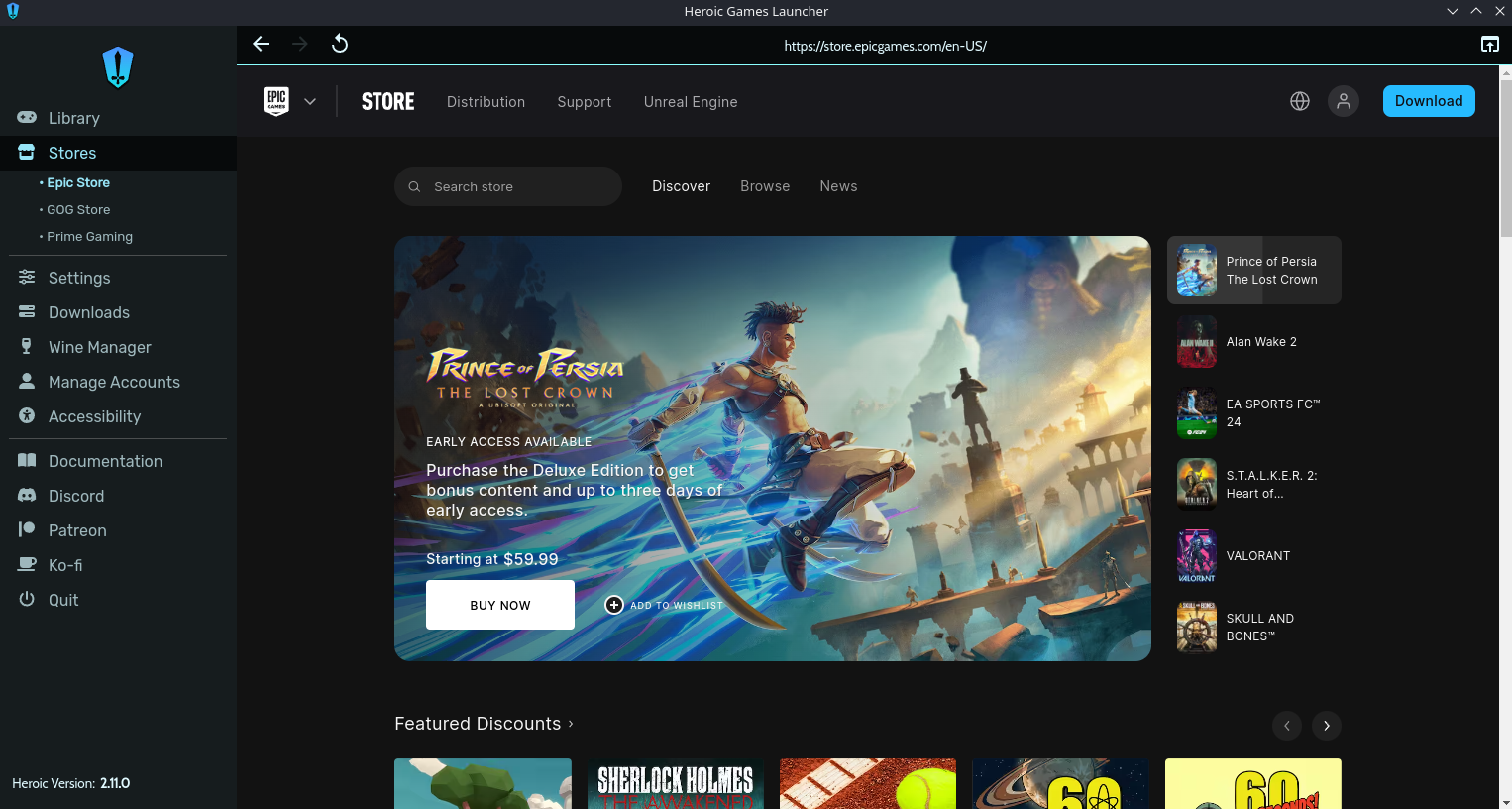
Epic Games Store on Heroic Games Launcher

You can stop here and start playing, but if you want to be able to play The Lost Crown in the Steam Deck’s default Gaming Mode, you need to do a couple more things.

  • To add the Heroic Games Launcher to your Steam library, open Steam in Desktop Mode and click “Add a Game” in the lower left-hand corner.
  • Choose “Add a Non-Steam Game.”
  • A preconfigured list of applications will populate. Find the Heroic Games Launcher and click the checkbox. Then click “Add Selected Programs.”
  • The Heroic Games Launcher can now be launched in Gaming Mode. You’ll find it in the “Non-Steam” section
  • If you want to take it one step further and add the game itself to your Steam library, once again click “Add a Game” and then “Add a Non-Steam Game”
  • This time you’ll want to click “Browse.”
  • Navigate to /home/deck/Games/Heroic
  • You’ll find an exe for The Lost Crown inside the Prince of Persia folder. Click the exe and press “Open.” Then choose “Add Selected Programs.”
  • In Steam, find the Prince of Persia exe and click the settings icon, then choose “Properties.”
  • You’ll probably want to rename the shortcut.
  • This last step is very important: While in “Properties” choose “Compatibility” and check the box to force Steam to utilize a Proton compatibility tool. Choose “Proton Experimental” from the dropdown.
  • Congratulations, you can now launch Prince of Persia: The Lost Crown like any of your native Steam games in Gaming Mode.
  • You can use Decky Loader to install SteamDB to add artwork for your game tile.
  • If you don’t want to use the Heroic Games Launcher, you can add the regular Epic Games Launcher to Steam Deck.

Adding Ubisoft Connect to Steam Deck

It’s also possible to play Prince of Persia: The Lost Crown via Ubisoft Connect, Ubisoft’s launcher, on Steam Deck. However, it should be noted that this method is a bit more complicated. Even if you buy The Lost Crown from Ubisoft Connect, we’d still recommend using the Epic Games Launcher or GOG Galaxy. You can link your Ubisoft Connect account to GOG and/or Epic and launch your games through those apps.

But if for some reason you’re set on using Ubisoft Connect, here’s how to set it up:

  • In Desktop Mode, go to ubisoftconnect.com and download the launcher
  • Don’t run the installer.
  • Open Steam. Click “Add a Game” in the lower left-hand corner and choose “Add a Non-Steam Game.”
  • Click “Browse” and navigate to the installer exe in your downloads folder.
  • Click “Open” and then “Add Selected Programs.”
Ubisoft Connect can be installed within the Steam app
  • Back in your Steam library, search for the Ubisoft Connect installer, click the settings gear and choose “Properties.”
  • You can change the name to Ubisoft Connect (via shortcut text box) and then click “Compatibility” in the side pane. Click the checkbox to force Steam to use a compatibility tool and choose “Proton Experimental.”
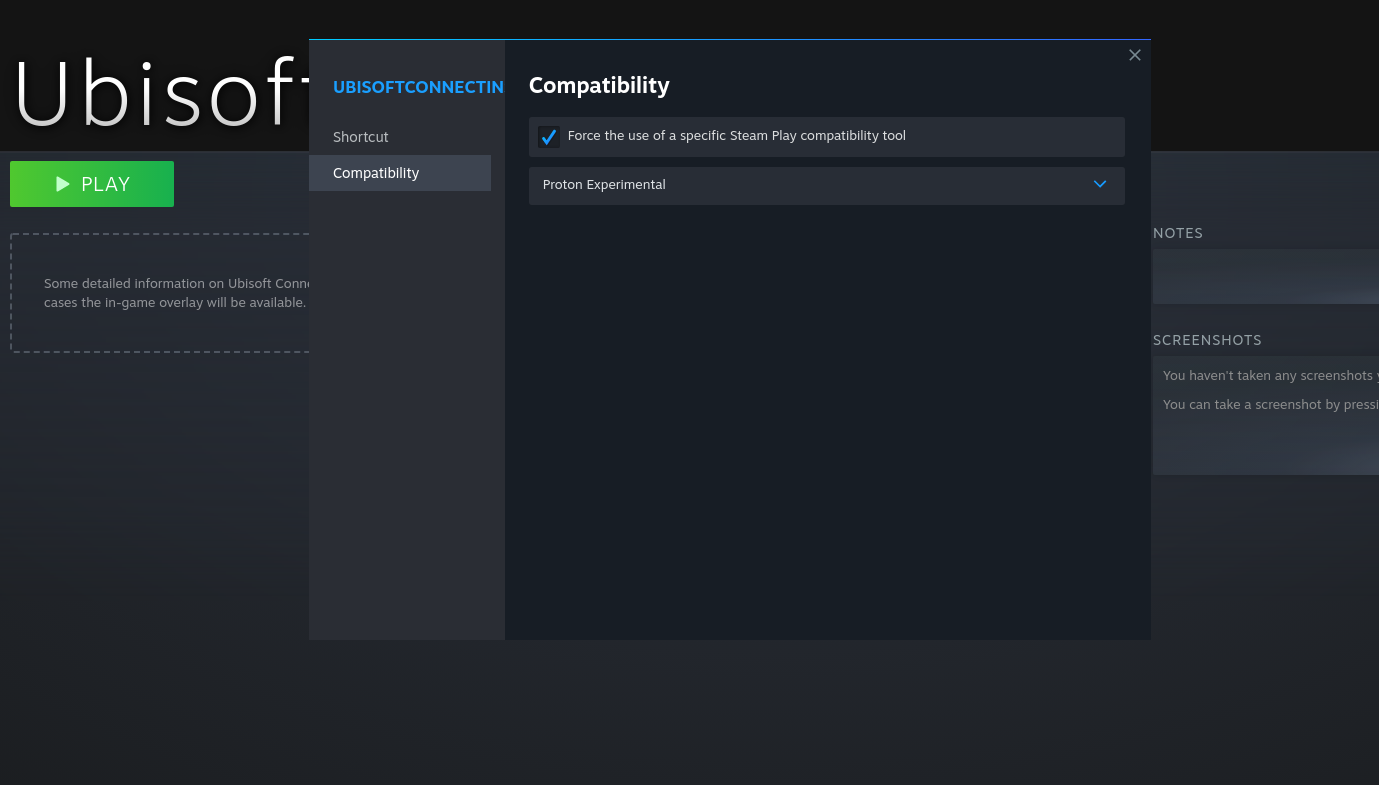
Use Steam Play compatibility tool to run the installer
  • Then click “Play” and the installation process will start.
  • Uncheck “Run Ubisoft Connect” at the end of the installation process.
  • With Ubisoft Connect installed, you now need to get the actual launcher in your Steam library. Otherwise, when you run it, you’ll just run the installation process again.
  • To add the actual launcher, we’re going to go back to “Properties.”
  • In the shortcut window, click “Browse” next to the “Target” box.
  • Now you’re going to find the location where our Steam Deck has created an imitation of the Windows file directory.
  • You need to make sure hidden files are visible on your Steam Deck. To do this, either use the keyboard shortcut ctrl + h or click the icon of three horizontal lines (next to the magnifying glas) in the top right-hand corner of the folder. Make sure the checkbox “Show Hidden Files” is checked.
  • With that squared away, here’s the path you’ll want to follow to set the proper “Target”:
  • home > .local > share > Steam > steamapps > compatdata > most recent folder # > pfx > drive c > programfiles86 > Ubisoft > Ubisoft Game Launcher > UbisoftConnect.exe
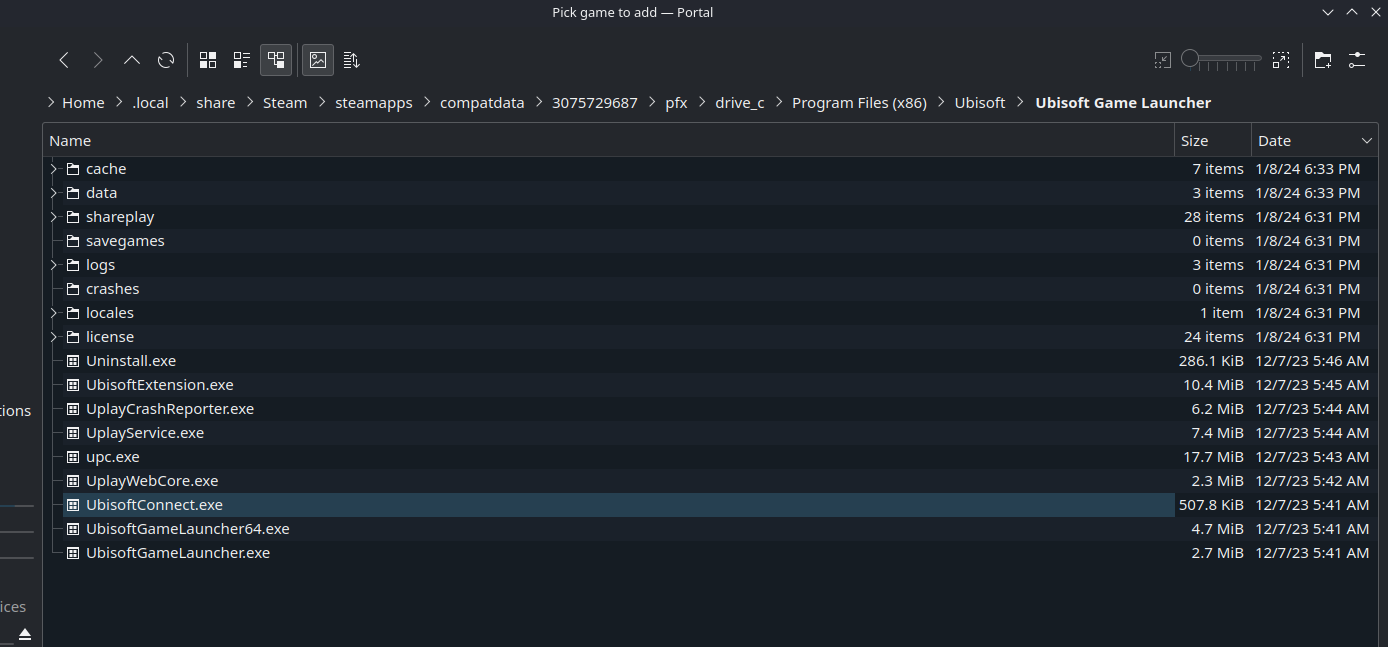
UbisoftConnect.exe is what you should be looking for in this for in this folder
  • “Most recent folder #” will be a string of roughly 10 numbers. It won’t be the same for everyone, but it should be easy as the newest folder in this directory.
  • Add quotation marks at start and finish of the path. Copy and paste the path in the text box for “Start In” as well.
  • Now you can launch Ubisoft Connect and install the game.
  • If you want to directly launch the game from Gaming Mode without first opening and browsing Ubisoft Connect, you can once again “Add a Non-Steam Game” to the launcher.
  • When you click “Browse,” it should open in the same sub-folder as before.
  • Navigate to /games/Prince of Persia The Lost Crown/TheLostCrown.exe and add it to your library.
  • Set Steam Play compatibility to “Proton Experimental” and rename the shortcut to your liking.
  • Make sure “Target” and “Start In” boxes match, and place the path inside quotation marks.
  • Lastly, we need to add a command to the text box for “Launch Options,” which is located below “Start In.” The following command tells Steam to launch Ubisoft Connect and Prince of Persia.
  • STEAM_COMPAT_DATA_PATH=”home/deck/.local/share/Steam/steamapps/compdata/most recent folder #” %command%
  • Replace “most recent folder #” with the string of numbers that corresponds to your Ubisoft Connect folder–it’s the same string found in your file path for “Target.”
Your Ubisoft games will be located in the same directory as the launcher
  • If you receive an error stating the launcher can’t be located when launching The Lost Crown, you can copy/paste the launcher inside /Ubisoft Game Launcher/games/Prince of Persia The Lost Crown/GameLauncher. This file is called UbisoftGameLauncher.exe and can be found in the Ubisoft Game Launcher folder.
  • You can use Decky Loader to install SteamDB to add artwork for your game tile.

Prince of Persia: The Lost Crown runs great on Steam Deck by default, so once you get the launcher situation sorted, you should be all set.
Read More

The Most-Anticipated PC Games Of 2024 And Beyond

The Most-Anticipated PC Games Of 2024 And Beyond

If you thought 2023 was a banger year for games, then you might want to brace yourself for the next 12 months and clear your schedule. While PlayStation and Nintendo have several exclusives locked and loaded on those respective systems, PC gaming still has plenty to choose from and the year ahead is already stacked with confirmed games…
Read More

Hyperkin Reveals A Sega Nomad Imitation Called Mega 95

Hyperkin Reveals A Sega Nomad Imitation Called Mega 95

The Mega 95 brings back the spirit of Sega’s last handheld system ever. Hyperkin has unveiled the portable console, which acts like a Sega Nomad in its ability to play Genesis cartridges. But the Mega 95 also takes inspiration from Nintendo Switch in plugging into a dock to bring the old 16-bit games to a TV screen as well.

The Verge reports Hyperkin hasn’t given the Mega 95 a release date or price point yet. The company does sell a similar handheld system for Super Nintendo cartridges–called the SupaBoy–that retails for $120. However, it doesn’t have a dock.
Featuring a 5-inch screen, the Mega 95 can apparently switch between widescreen 16:9 and retro 4:3 displays for Genesis games. The battery life for the portable system is estimated to last 10 hours.

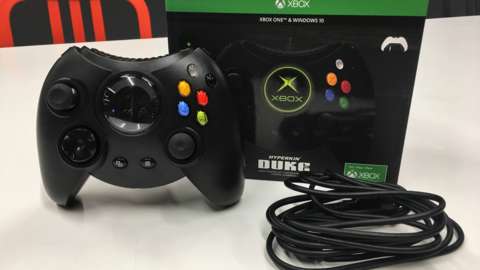
Hyperkin is also remaking the original Xbox Controller S with some major upgrades for Xbox Series X|S, Xbox One, and Windows 10 and 11 PCs. Like the Mega 95, the pad named the DuchesS doesn’t have a release date or price point.

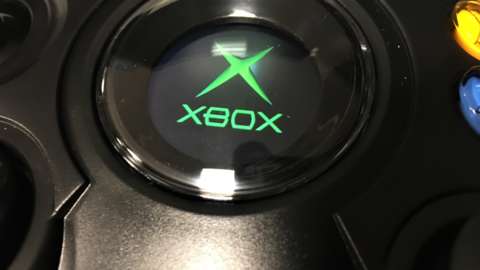
It’s been almost six years exactly since Hyperkin brought back the original Xbox controller called the Duke. The company was also behind the revival of the Xbox 360 pad for Xbox Series X|S, too.
Read More

Sea Of Thieves Could Make Landfall On PlayStation

Sea Of Thieves Could Make Landfall On PlayStation

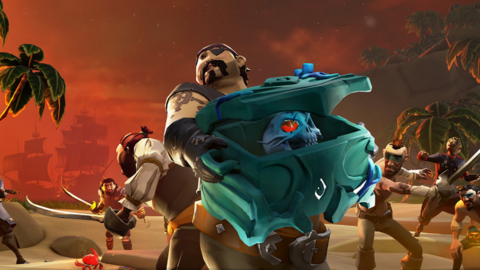
Microsoft has reportedly explored the waters of shipping Sea of Thieves on PlayStation and even Nintendo Switch. However, it’s unknown if these plans are in progress or were shelved at Xbox on the Rare-made pirate game.

Game File noted that it talked with a source knowledgeable about a Sea of Thieves port for PlayStation but couldn’t quite nail down whether this was still in the works. In addition, Jeff Grubb of GameSpot sister site Giant Bomb said on Game Mess Mornings that he also heard the pirate game could come to Sony’s system as well as Nintendo Switch.

Sea of Thieves celebrated its five-year anniversary last March, and at that time, over 30 million people had checked out the multiplayer-centric game. It’s been a cornerstone title on Xbox Game Pass for Xbox consoles and PC.

This comes on top of a new report that more Xbox games could be releasing on rival platforms. The main potential first-party title spotlighted was Hi-Fi Rush on Switch. Previously, Microsoft has published Ori and the Blind Forest on Nintendo’s system, with Ori and the Will of the Wisps making its way onto the hybrid console, too.

All of these games are also available on Xbox Game Pass. But Xbox head Phil Spencer said just last month that Microsoft has “no plans to bring Game Pass to PlayStation or Nintendo.” So the company might just be exploring multi-platform releases on a title-by-title basis, especially after acquiring Activision Blizzard.

Read More

Daily Deals: AirPods Pro, PowerBlock Adjustable Dumbbells, Switch/Steam Deck Gaming Display, Electric Standing Desks, and More

Daily Deals: AirPods Pro, PowerBlock Adjustable Dumbbells, Switch/Steam Deck Gaming Display, Electric Standing Desks, and More

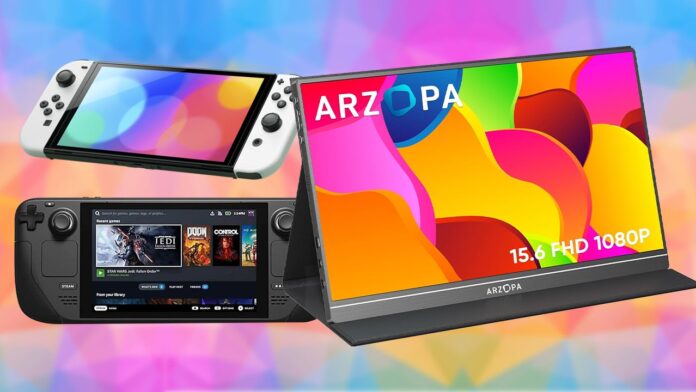
Today’s daily deals include the newest AirPods Pro with USB, a 15″ portable monitor for your Steam Deck or Nintendo Switch, an electric standing desk for under $85, adjustable dumbbells that are way cheaper than Bowflex, a 2TB PS5-compatible SSD, RGB floor lamps, and more.

Apple AirPods Pro with USB Type-C for $189

New USB Type-C Model
Apple AirPods Pro Noise-Cancelling Truly Wireless Earbuds
24% off $249.00
$189.00

To kick off the new year, Amazon is offering the newest generation Apple AirPods Pro truly wireless noise cancelling earbuds with the universal USB Type-C connector for only $189, a savings of $60. This is the lowest price we’ve ever seen and it matches the deal we saw during Black Friday and Cyber Monday.

Arzopa 15″ 1080p USB Type-C Portable Monitor for $69.99

Amazon Prime members only
Arzopa 15.6″ 1080p USB Type-C Portable Monitor
46% off $129.99
$69.99

Amazon is offering an excellent deal on this Arzopa 15″ 1080p USB Type-C portable monitor. It’s normally $129.99, but Amazon Prime members can get it for $95.99. There’s also a $26 clippable coupon that drops the price even further to $69.99. This 15″ 1080p monitor works as a secondary display for your laptop, tablet, phone, gaming console, or pretty much any device that has either a USB or HDMI output, including Nintendo Switch and Steam Deck consoles.

Dumo Electric Standing Desk for $83.99

Dumo 55″x24″ Electric Standing Desk
16% off $99.99
$83.99

Amazon is offering this Dumo 55″x24″ Electric Standing Desk for a mere $83.99 shipped. This is easily one of the least expensive electric standing desks we’ve seen, and it has more features than you’d expect from the budget price, like memory presets, cable grommets, and headphone hooks.

PowerBlock 5 to 50lb Adjustable Dumbbells for $219.99

PowerBlock EXP Stage 1 (5 to 50lbs) Adjustable Dumbbell Set
42% off $379.99
$219.99

Bowflex isn’t the only option when it comes to adjustable dumbbell sets. PowerBlock is another trusted brand that offers its own version, and right now it’s on sale. Woot has the PowerBlock EXP Stage 1 (5 to 50lb) adjustable dumbbell set for only $219.99. Amazon Prime members get free shipping (otherwise play $6 flat rate shipping). That’s over 40% cheaper than a comparable set of Bowflex SelectTech dumbbells.

It gets even better. If you need even more weights than the base 100 pounds (50lbs per dumbbell), then you can pick up the expansion kits on sale as well. Both the Stage 2 (50 to 70lb) Expansion Kit and Stage 3 (70 to 90lb) Expansion Kit are only $89.99 each, normally $179.

Crucial 2TB SSD (PS5-Compatible) From $107.99

Crucial P5 Plus 2TB PCIe Gen4 x4 M.2 SSD with Heatsink
$119.99

Crucial T500 2TB PCIe Gen4 x4 M.2 SSD without Heatsink
$107.99

SSD prices are trending upwards for 2024 and we don’t know how long that will last. Most 2TB PS5-compatible SSDs are already currently selling for $130 or higher, but there is one exception. Right now Amazon is offering the Crucial P5 Plus 2TB PCIe Gen4 x4 M.2 solid state drive (SSD) with preinstalled heatsink for only $119.99. Alternatively, you can pick up the even newer Crucial T500 2TB SSD for only $107.99. The T500, however, doesn’t include a preinstalled heatsink so you’ll have to pick up a separate heatsink on Amazon and install it yourself.

Govee Lyra RGBIC LED Floor Lamp for $89.99

Clip the $60 Off Coupon
Govee Lyra RGBICWW Floor Lamp
40% off $149.99
$89.99

The Govee Lyra RGB Floor Lamp normally retails for $149.99, but right now you can get it for $89.99 after you clip a $60 off coupon on the product page. The Lyra is essentially a 30W LED light strip that’s embedded into a vertical column. You direct it towards the wall for ambient lighting. The 1500 lumen rating means that it can produce a decent amount of light. The Lyra consists mostly of metal with a satin brushed aluminum finish. It has RGBIC + WW (warm white) LEDs. RGBIC LEDs can light up independently of each other, which means that the lamp is capable of some pretty fancy light effects with its 16 million color range and 48 dynamic preset scene modes. The warm white LEDs are better at producing a wide range of white light than RGB LEDs, from “cool” daylight to “warm” incandescent. The Lyra is also WiFi connected, so everything can be controlled from the Govee app or your smartphone.

2021 Apple iPad 10.2″ 64GB for $249

Amazon is offering a brand new 2021 Apple iPad 10.2″ Wi-Fi 64GB tablet for only $249. This iPad normally retails for $329, so you’re saving about 25%. Although this isn’t the latest model currently available, it’s still a brand new, genuine Apple tablet and has a 1 year warranty that is also AppleCare eligible.

48″ LG 48GP900-B 4K OLED Gaming Monitor for $850

LG UltraGear 48GP900 48″ 4K (3840×2160) OLED Gaming Monitor
43% off $1,499.99
$850.00

Amazon currently has the 48″ LG 48GP900-B 4K OLED gaming monitor for only $850.00 shipped. This monitor was released in 2022 at a starting MSRP of $1500. This is currently the least expensive 48″ OLED gaming monitor on the market, and it’s also one of the best.

Xbox Elite Wireless Controller Series 2 for $95.99

Red/Black
Microsoft Xbox Elite Series 2 Core Wireless Controller
31% off $139.99
$95.99

Target recently dropped the price of the professional-grade Xbox Series X Elite Series 2 Core Wireless Controller in Red/Black to $95.99. It’s less expensive than the Black/White and Blue/Black variants. This controller wasn’t discounted at all during Black Friday and Cyber Monday and would make for an awesome holiday gift for any Xbox gamer who appreciates precision control and customizability.

Note that Target RedCard members get an extra 5% discount. Signing up is free.

34″ Alienware QD OLED Gaming Monitor for $799.99

Bonus $100 Dell eGift Card
Alienware AW3423DWF 34″ 3440×1400 Curved 0.1ms 165Hz QD-OLED Gaming Monitor
20% off $999.99
$799.99

This Black Friday deal is back. Dell has the highly rated Alienware AW3423DWF 34″ QD-OLED gaming monitor for only $799.99. That’s $200 less than MSRP and the least expensive 34″ OLED gaming monitor available right now. This is the same panel found in the Samsung Odyssey G8 34″ QD OLED gaming monitor which is currently $1200 at Samsung direct.

Alienware Aurora R15 i7 RTX 4080 PC for $1999.99

Alienware Aurora R15 Liquid Cooled Intel Core i7-13700KF GeForce RTX 4080 Gaming PC with 16GB RAM, 512GB SSD, 1TB HDD
26% off $2,699.99
$1,999.99

To kick off the new year, Dell is offering the Alienware Aurora R15 RTX 4080 gaming PC for only $1999.99 after a $700 instant discount. The 13th gen Intel Core i7-13700KF processor is Turbo Boost clock speed of 5.4GHz with 16 cores, 24 threads, and a 30MB cache. It’s cooled by a robust 240mm all-in-one liquid cooler and a generous 750W PSU powers the rig. The RTX 4080 is the second most powerful card on the market. It’s much more powerful than previous generation cards, performing about 50% faster than an RTX 3080 Ti.

Read More

Video Game Movies And TV Shows Finally Got Good In 2023

Video Game Movies And TV Shows Finally Got Good In 2023

While 2023 was certainly a great year for movies and TV shows as a whole (unless you’re the Marvel Cinematic Universe), it was an especially great year for adaptations of our favorite video game franchises. As a prime example, Nintendo and Illumination Studios’ The Super Mario Bros. Movie hit theaters in April. It was hard to know if the movie was going to work, as even the casting of Chris Pratt stirred disdain among fans. Would they be willing to watch Super Mario on the big screen?

It turns out, they absolutely would. The Super Mario Bros. Movie would earn more than $1.3 billion at the box office, becoming the third-biggest animated feature ever–behind Disney’s Lion King remake and Frozen II. It’s also the highest-grossing video game movie of all time, and the second-biggest movie of 2023, domestically and worldwide. That’s a pretty dramatic change, compared to previous years.

“I think that part of the problem with translating games to movies is that the structure of what makes a good game is very different from the structure of what makes a good movie,” Super Mario and Legend of Zelda creator and all-around video game icon Shigeru Miyamoto said back in 2007, after years of bad adaptations that included 1993’s Super Mario Bros.

“Movies are a much more passive medium, where the movie itself is telling a story, and you, as the viewer, are relaxing and taking that in passively. Whereas video games are a much more active medium where you are playing along with the story,” he continued. “I think that video games, as a whole, have a very simple flow in terms of what’s going on in the game. We make that flow entertaining by implementing many different elements to the video game to keep the player entertained.”

Historically, video games have been a bit of a gamble, and Miyamoto’s explanation of why does hold some water–or at least it used to. As much as you might be nostalgic for Paul W.S. Anderson’s Resident Evil films, they weren’t good. Sure, they earned at the box office, but as the movies went on the connection to the games waned–and it wasn’t very strong to begin with. Fans still showed up for 2016’s Resident Evil: Final Chapter and it made more $300 million, despite it’s essentially Resident Evil in name only. Did fans not care about the source material or were they invested in this franchise’s separate narrative? It’s hard to say because over at Rotten Tomatoes, the score was decidedly rotten from critics and fans.

Anderson of course got the Resident Evil job due to the first Mortal Kombat movie becoming the most financially successful video game movie at the time. Outside of silly movies like those, we also had a string of terrible adaptations by Uwe Boll, Angelina Jolie’s Tomb Raider films, and even enjoyable schlock like Mortal Kombat: Annihilation. Some of these movies are fun (others definitely aren’t), but it’s hard to consider any of them wildly successful or as something that would stand the test of time. In fact, it wasn’t until 2019 that a video game movie (Detective Pikachu) earned a “fresh” rating on Rotten Tomatoes.

Still, in the time since that movie, video game adaptations have been very hit or miss (remember Monster Hunter and Resident Evil: Welcome to Raccoon City?). That all leads to 2023, where Super Mario Bros. kicked off a great year for video game movies.

“We definitely had a blockbuster approach to making this movie. To me, this is a movie that’s been like 40 years in the making, you know, and I’ve always considered Mario more of an action game,” director Aaron Horvath told GameSpot back in April. “The characters look comedic, but the story is always high-stakes, you gotta save the princess or save the world or whatever in the game. So we wanted to reflect that action sensibility.”

Is that why well-made video game adaptations are finally on the upswing? It definitely seems more creatives want the end product to reflect and capture what the audience pulls from their collective consciousness on what they think of when these games come to mind. The sights, sounds, and music cues all play a part in the experience. That’s at least one area where the first live-action Mario movie failed with that level of detachment. Looking back on those botches as examples has led to filmmakers and game studios to be exponentially more careful throughout the creative process of bringing your favorite video games to life.

I’d like to think that the industry has learned from its mistakes in what makes an adaptation work and what doesn’t. While there is a generation of video game fans that grew up on movies based on beloved properties in name only, much like the ’90s comic book movie craze–Warner Bros.’s Steel is a perfect example–modern audiences expect something more than a vacant commercialistic cash grab. They definitely got that with Mario, but also on the small screen, too, at the beginning of the year.

Before The Super Mario Bros. Movie debuted, we got HBO’s live-action take on zombie survival series The Last of Us, which GameSpot has named the best TV show of 2023. While some story deviations had to be done to beef up the series–with some being huge, but adding more gravitas to the level of mourning the world experienced–fans couldn’t get enough of the show, and it was quickly renewed for a Season 2. The series was a huge part of the pop cultural zeitgeist and hard to ignore. You even had star Pedro Pascal dancing with clickers from the show on SNL commercials.

With examples like The Last of Us, Super Mario, and even shows like Peacock’s Twisted Metal and Netflix’s Cyberpunk: Edgerunners, what makes for a good video game adaptation is expanding. There’s a formula that takes the already established property and elevates it to a degree that not only makes the show engaging but triggers something in our brain that takes us back to when we first played that particular game.

Look at Five Nights At Freddy’s. Warner Bros. tried getting a movie going barely a year after the game’s initial release. In the meantime, seven sequels and five spin-off games have been released and its fanbase has been clamoring for more. A Five Nights movie would eventually land at Blumhouse and hit theaters and Peacock in late October. The feature would go on to be Blumhouse’s biggest movie of all time earning almost $300 million, even though it could be streamed from home on Peacock. It wasn’t because of an unending devotion to the game’s canon. Instead, the film used the story of the games to build out its own take on the events that unfold at the rundown and haunted pizzeria. It doesn’t disregard what fans know from the games, but remixed it to serve a new story.

Gran Turismo, based on the iconic racing video game series, took an entirely different route. Instead of being about the game, it was inspired by the real-life story of a Gran Turismo fan getting the chance to become an actual race car driver.

On the television side, you had Castlevania: Nocturne premiering on Netflix this past fall and being quickly renewed for a Season 2. That spin-off featured Richter Belmont, the protagonist of several Castlevania games and part of the overall story of Symphony of the Night. Nocturne fills in a lot of blanks of Richter’s lore and sits at Rotten Tomatoes with a 100% Metacritic score.

These movies and shows demonstrate that, while Miyamoto may have had an appropriate reaction when asked about video game adaptations nearly two decades ago, that’s no longer the case in 2023. Instead, now it’s basically a tightrope walk to meet fan expectations, while also giving viewers something more to latch onto. The thing about the The Super Mario Bros. Movie, which is produced by Miyamoto, is that it hit a lot of notes that we know are Mario things. Yes, Easter eggs are important to an extent and there are plenty of them to behold. However, those winks and nods don’t move the film’s plot along or make it “good.” If the Super Mario Bros. Movie was just an Easter egg buffet, it would be void of any real purpose and just another film on the pile of video game rubbish.

Hopefully, though, those days are over. There’s a level of reverence going into making really good video game movies that was missing before. In success, we can keep that sort of momentum and energy moving by the time we get to the Legend of Zelda live-action movie heading our way in a few years. From there, who is to say what could be next? We still have a plethora of franchises studios could bring to theaters and, through that, get a generation to find the games they’re based on and treasure them as we have. Plus at least a few more Sonic the Hedgehog movies.

Read More

Super Mario 64 Footage Seemingly Shows Off a Multiplayer Mode With Luigi For the First Time

Super Mario 64 Footage Seemingly Shows Off a Multiplayer Mode With Luigi For the First Time

A YouTube video with VHS footage from Nintendo’s Japanese Space World show from 1995 has seemingly given us our first-ever look at the multiplayer mode with Luigi that never saw the light of day in Super Mario 64.

As reported by VGC, we get the briefest look in a video uploaded by Now In Game Channel of what appears to be Luigi doing a spin jump next to Mario in Super Mario 64. This is obviously of note as Luigi was never part of the final version of N64’s Super Mario 64. He did appear in the DS version alongside Mario, Yoshi, and Wario, however.

Image via Now In Game’s YouTube

This room could be part of the early days of Super Mario 64 development, as Shigeru Miyamoto previously talked about how Luigi was part of the game but was taken out near the finish line in a roundtable interview (via shmuplations.com) for two official Japanese strategy guides from 1996.

“Well… until February, he was in the game. (laughs) Ultimately, due to memory issues, we had to take him out,” Miyamoto said. “Then we were going to include him in a Mario Bros. style minigame, but because most users probably only have that one controller when they first buy their N64, for that reason (and others) we decided not to.”

This Mario Bros. style minigame could be what we are looking at, or more likely it could be the room that helped the team at Nintendo learn all they needed to make Super Mario 64.

“Well, in the beginning… we were working on something really simple—deceptively simple, even, from the perspective of the team that would go on to finish the huge, final game. (laughs) There was a room made of simple lego-like blocks, and Mario and Luigi could run around in there, climb slopes, jump around, etc. We were trying to get the controls right with an analogue 3D stick, and once that felt smooth, we knew we were halfway there,” Miyamoto said.

In an Iwata Asks from 2009, Miyamoto also shared a bit more about what this multiplayer mode would have been.

Loading
Play

“The screen was split and they went into the castle separately,” Miyamoto said. “When they meet in the corridor, I was incredibly happy! (laughs) Then there was also the mode where the camera is fixed and we see Mario running away, steadily getting smaller and smaller.”

In 2020, the Nintendo Gigaleak provided us with an early build of Super Mario 64 called “Ultra 64 Mario Brothers” that contained files that referenced Luigi. Modders took those files and went about recreating Mario’s brother and how he’d look.

Have a tip for us? Want to discuss a possible story? Please send an email to newstips@ign.com.

Adam Bankhurst is a news writer for IGN. You can follow him on Twitter @AdamBankhurst and on Twitch.

Read More

Zelda Boss Is Excited About Next Nintendo Console And What “New” Things It Can Do

Zelda Boss Is Excited About Next Nintendo Console And What “New” Things It Can Do

Nintendo will eventually make another hardware platform. And there will eventually be another Zelda game for it. Neither are 100% confirmed, of course, but both are some of the safest bets anyone could make. Zelda producer Eiji Aonuma has now discussed, at a high level, what Nintendo’s designers think about when tackling new hardware.

Speaking to Polygon, Aonuma–who has worked on the Zelda series for decades and has been part of the team during multiple console transitions–laid out some of the areas that Nintendo focuses on.

“,”480”:”nnnnnnnnnn“}},”device”:”other”,”isDevice”:false,”isLiveStream”:false,”videoType”:”video-on-demand”,”countdownTime”:0,”guid”:”gs-2300-6461355″,”ageGateCookieName”:”videoAgeGateBirthday”,”watchedCookieName”:”watchedVideoIds”,”watchedCookieDays”:1,”postPlayMax”:100,”adCall”:{“host”:”http://pubads.g.doubleclick.net/gampad/ads?”,”params”:{“iu”:”/5441/vaw-gamespot/desktop/gamespot.com”,”impl”:”s”,”gdfp_req”:1,”env”:”vp”,”output”:”xml_vmap1″,”unviewed_position_start”:1,”url”:”[referrer_url]”,”correlator”:”[timestamp]”,”description_url”:”[description_url]”,”cmsid”:2566084,”vid”:6461355,”pp”:”vpaid_js”},”custParams”:{“ptype”:”news_article”,”cid”:”gs-1100-6519987″,”game”:”the-legend-of-zelda-tears-of-the-kingdom,the-legend-of-zelda-breath-of-the-wild”,”con”:”nintendo-switch,wii-u”,”publisher”:”nintendo”,”embed”:”autoplay”,”franchise”:”legend-of-zelda”,”category”:”games”,”franchiseRoot”:”legend-of-zelda”,”partner”:”desktop/gamespot.com”,”vid”:6461355},”soundBasedSize”:{“normal”:”640×480″,”muted”:”640×483″,”none”:”640×480″},”daiSsbUrl”:”https://dai.google.com/ondemand/hls/content/2572465/vid/6461355/master.m3u8″,”daiMidRollHost”:2500176},”uvpHi5Ima”:”https://s0.2mdn.net/instream/html5/ima3.js”,”cuePoints”:null,”uvpc”:””,”partner”:”gamespot”,”adPartner”:”desktop/gamespot.com”,”desktopAdPartner”:”desktop%2Fgamespot.com”,”mobileAdPartner”:”mobile_web%2Fgamespot.com_mobile”,”mapp”:”gamespot”,”cms”:”pi”,”seekablePlaybacks”:[“html5″,”uvpjs”],”tracking”:[{“name”:”SiteCatalyst”,”category”:”qos”,”enabled”:true,”params”:[{“name”:”charSet”,”value”:”UTF-8″},{“name”:”currencyCode”,”value”:”USD”},{“name”:”siteType”,”value”:”responsive web”},{“name”:”trackingServer”,”value”:”saa.gamespot.com”},{“name”:”visitorNamespace”,”value”:”cbsinteractive”},{“name”:”heartbeatTrackingServer”,”value”:”newimagitasinc.hb.omtrdc.net”},{“name”:”heartbeatVisitorMarketingCloudOrgId”,”value”:”3C66570E5FE1A4AB0A495FFC@AdobeOrg”},{“name”:”partnerID”,”value”:”gamespot”},{“name”:”siteCode”,”value”:”gamespot”},{“name”:”brand”,”value”:”gamespot”},{“name”:”account”,”value”:”cbsigamespotsite”},{“name”:”edition”,”value”:”us”}]},{“name”:”ComScore_ss”,”category”:”qos”,”enabled”:true,”params”:[{“name”:”c2″,”value”:”31824268″},{“name”:”publishersSecret”,”value”:”2cb08ca4d095dd734a374dff8422c2e5″},{“name”:”c3″,”value”:””},{“name”:”partnerID”,”value”:”gamespot”},{“name”:”c4″,”value”:”gamespot”}]},{“name”:”NielsenTracking”,”category”:”tracking”,”enabled”:true,”params”:[{“name”:”host”,”value”:”https://secure-us.imrworldwide.com/cgi-bin/m?”},{“name”:”scCI”,”value”:”us-200330″},{“name”:”scC6″,”value”:”vc,c01″}]},{“name”:”MuxQOSPluginJS”,”category”:”qos”,”enabled”:true,”params”:[{“name”:”propertyKey”,”value”:”b7d6e48b7461a61cb6e863a62″}]}],”trackingAccount”:”cbsigamespotsite”,”trackingSiteCode”:”gs”,”trackingPrimaryId”:”cbsigamespotsite”,”videoAssetSource”:”GameSpot”,”uvpjsHostname”:”//www.gamespot.com”,”siteType”:”responsive web”,”startMuted”:false,”screenMediumThumb”:”https://www.gamespot.com/a/uploads/screen_medium/1352/13527689/4136190-review_loztotk_site.jpg”,”videoStreams”:{“adaptive_stream”:”https://cdn.jwplayer.com/manifests/ph0lsJmR.m3u8″},”userId”:0,”premium”:false,”datePublished”:1683806400,”videoAdPartner”:”desktop%2Fgamespot.com”,”videoAdMobilePartner”:”mobile_web%2Fgamespot.com_mobile”}” data-non-iframe-embed=”1″ data-jw-context-name=”gamespot” data-jw-media-id=”ph0lsJmR” data-jw-player-url=”https://cdn.jwplayer.com/libraries/VXc5h4Tf.js” data-jw-video-token=”” data-has-youtube=”” data-youtube-icon-path=”https://www.gamespot.com/a/bundles/phoenixsite/images/core/loose/icn-youtube-30×30.png”>

Now Playing: The Legend Of Zelda: Tears Of The Kingdom Video Review

He said Nintendo’s designers think about things like, “‘What can we do that’s new? ‘What will we be able to do?’ ‘What kind of new themes will we be able to explore?'”

“And so I think, rather than focusing on the past, when we’ve changed from one console to another, it’s more than a feeling of saying goodbye. It’s a feeling of excitement. It’s about what will be the new things that we’ll be able to do,” he said.

Also in the interview, Aonuma said he thinks it’s a “miracle of sorts” that the Zelda series has remained ongoing and successful after so many years. “That’s not something that I credit myself with, but instead with being surrounded by a team of really talented people. Getting to work with them and discussing our ideas about the game is something that has been responsible for the continuance of the series,” he said.

Aonuma didn’t discuss any specifics about whatever Zelda game might be coming next, but he remarked, “I’m excited about the changes that we’ll be able to accomplish together.”

Before this, Aonuma hinted that the future of the mainline Zelda series does not involve traditional linear Zelda adventures of old coming back any time soon.

“It’s interesting when I hear people say [they prefer the older games] because I am wondering, ‘Why do you want to go back to a type of game where you’re more limited or more restricted in the types of things or ways you can play?'” Aonuma said in the interview. “I do understand that desire that we have for nostalgia, and so I can also understand it from that aspect.”

The latest entry in the main series, Tears of the Kingdom, has sold more than 19.5 million copies worldwide. Its predecessor, Breath of the Wild, shifted more than 31 million copies. Both were also adored critically, with Tears of the Kingdom heralded by GameSpot as one of the best Switch exclusives of 2023.

Nintendo has reportedly already sent “development kits” for the Switch 2 to some developers so they can begin building games with it, and the console is reportedly set to launch to the public in 2024. Officially, however, Nintendo is not confirming the existence of any new hardware, except for stating that a new console will release by the year 2100.

Read More

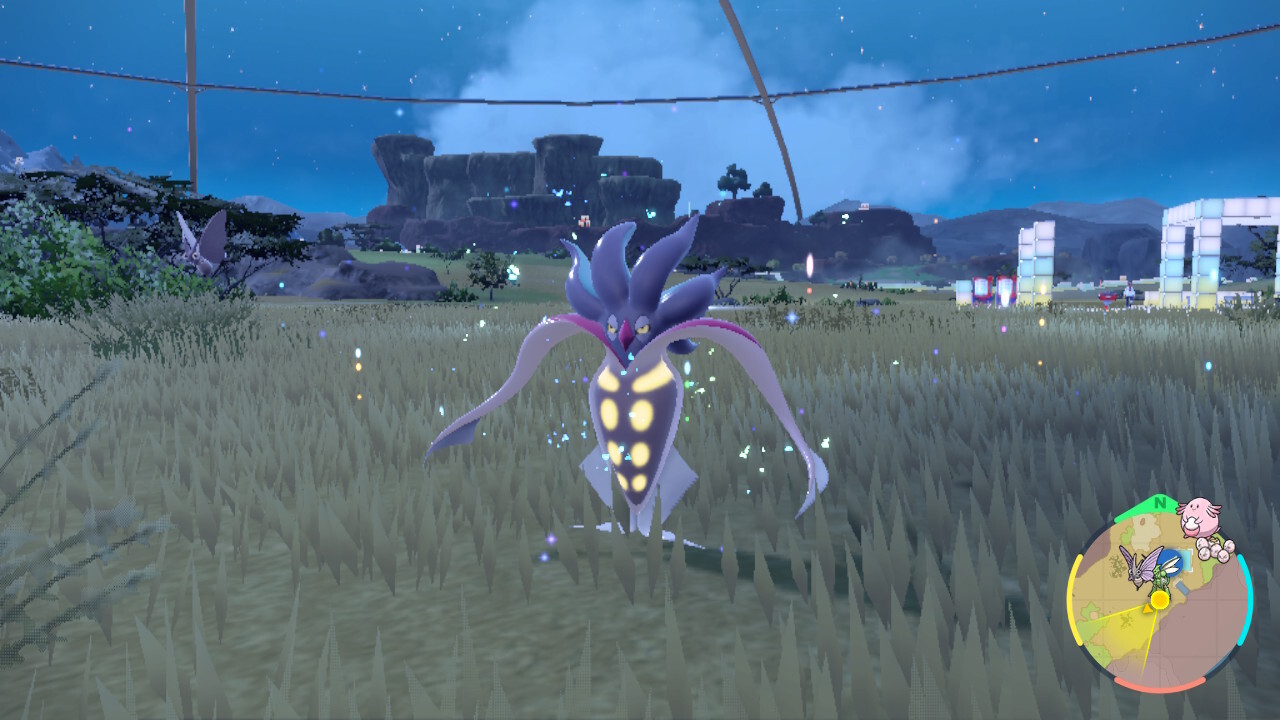
How To Evolve Inkay Into Malamar In Pokemon Scarlet And Violet DLC

How To Evolve Inkay Into Malamar In Pokemon Scarlet And Violet DLC

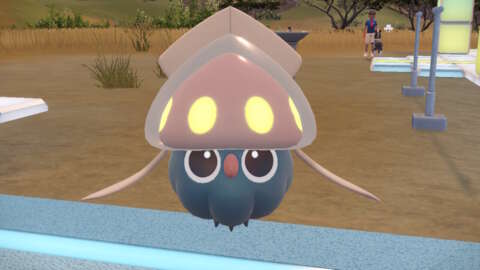
Inkay, the small squid Pokemon, has returned in Pokemon Scarlet and Violet as part of the Indigo Disk DLC, along with its confusing evolution method. This dark/psychic originally appeared on the Nintendo 3DS in Pokemon X and Y with a special method of evolution. In the 3DS version, you had to physically turn your handheld upside in order to get the Pokemon to evolve. This method is similar to how it’s done on Nintendo Switch in the Pokemon Scarlet and Violet Indigo Disk DLC, although there are a few additional caveats.

Where to catch Inkay

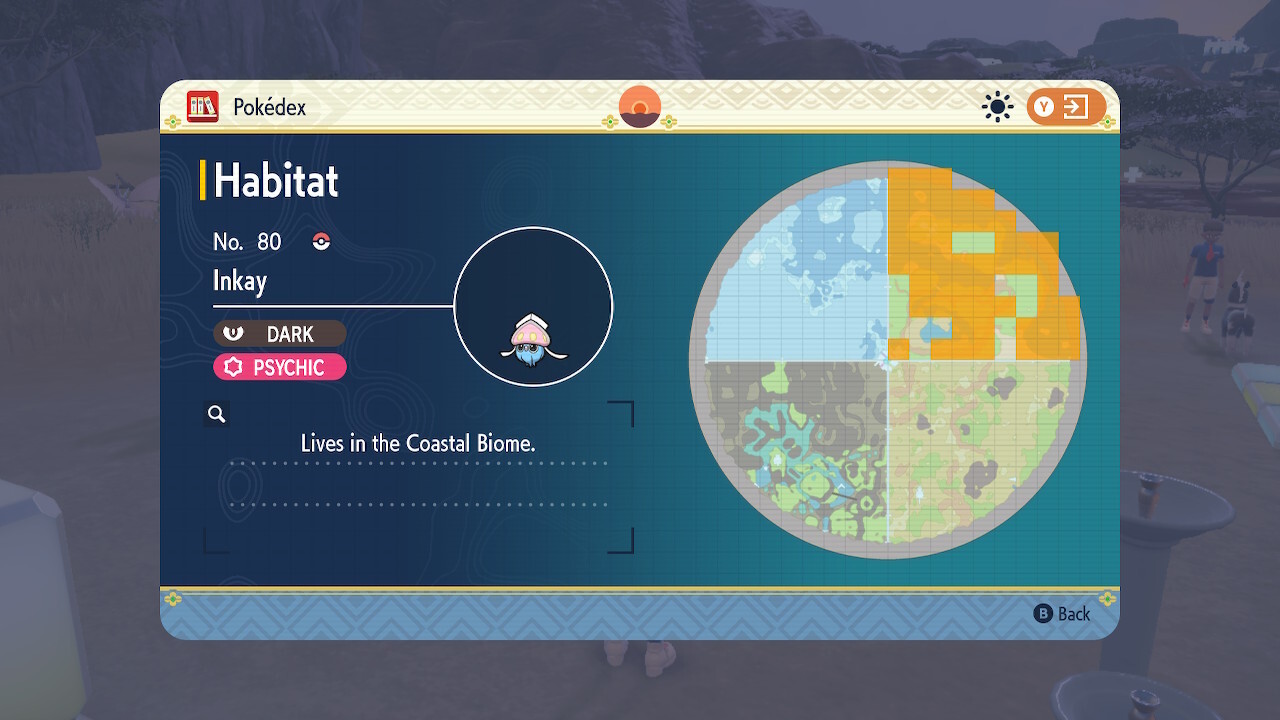
Inkay can be found near beaches and water in the Coastal Biome.

Inkay is found in the Coastal Biome section of the Terarium, which is the northeastern section of the new area in the Indigo Disk DLC. While they do appear pretty much anywhere in this area, the best places to look are the beaches or in the water itself.

How to evolve Inkay into Malamar

Inkay evolves into Malamar, if you hold your Switch upside down.

To evolve Inkay into Malamar, Inkay will need to be at least level 30, but all of the ones found in the wild should be over level 50. From there, you will need to level up Inkay to get them to evolve but there are a few special parameters. Inkay will need to level up from battle, not EXP candy. You can use candy to get Inkay close to leveling up, but the final bit of EXP needs to come from a battle against either a trainer or a wild Pokemon. Inkay does not need to do the battling though.

Most importantly, your Nintendo Switch needs to be in handheld form and held upside down when Inkay levels up. No external controllers can be powered on, only the Joy-Cons attached to the Nintendo Switch. EXP is given out rather quickly in Pokemon Scarlet and Violet, so the best thing to do is turn your Switch upside down as soon as you see the enemy Pokemon’s HP hit zero and keep it that way until Inkay starts to evolve into Malamar. If you miss your shot, you will need to level Inkay up again while repeating the method.

Read More

The Best Aussie Gaming and Tech Gifts to Give This Holiday 2023

The Best Aussie Gaming and Tech Gifts to Give This Holiday 2023

The holiday season has begun in earnest, and the clock is ticking on your gift-giving obligations. While I’m sure the list for what you want rolls out the door and down the street, coming up with ideas for others is tough. That’s where I come in, with my personal picks and a rock-solid who’s-who of the hardware, peripherals, and games that every gamer worth their thumbs wants.

Aside from the inescapable minefields that are always going to be individual genre tastes and preferred controller colours, you really can’t go wrong with what’s presented below. Worst-case scenario: gravitate to those gift card options and slap them into an amusing pop-up and/or scratch ‘n’ sniff bit of foldable cardboard. People who don’t appreciate those probably don’t deserve presents in the first place.

My Top Picks

Before we get into the usual fare, here’s some stuff that’s burning Rudolph nose bright on my radar.

Seagate FireCuda 520N SSD
The facts: every gamer hungers for yet larger storage that’s blisteringly fast. You pretty much can’t go wrong with this one. The FireCuda 520N is an ultra-small, reliable, high-capacity NVMe SSD that will hold and shift data like greased lightning.
A$349.95

This was the year where I saw an explosion in not only Steam Deck (grey) import sales but also the official launches of some third-party competitors to Valve’s venerable handheld. What they all have in common: base models with humble storage that can be cost-effectively supersized with your choice of a 2230-S2 M.2 form factor SSD.

That being said, my choice is Seagate’s FireCuda 520N SSD as the perfect storage upgrade for the aforementioned PC handhelds, plus it’ll work like a charm in a Microsoft Surface, your laptop, and a ton of other compact devices. Better yet, it offers an impressive read/write speed of up to 5,000 MB/s for the 2TB capacity and up to 4,800 MB/s for the 1TB model.

Espresso Premium Bundle
In this bundle is an award-winningly thin 15″ monitor (touchscreen version), a microfibre display case, a magnetically attachable / foldable stand, and an espressoPen. The name of the game here is ludicrous portability and easy connectivity.
19% off A$1,324.00
A$1,075.00

If you have an artistic bend or the simple desire to have an incredibly well-built, ultra-portable second screen for on-the-go work, welcome to the Espresso range of products. I’ve tested one of these bad boys on an overseas trip and was mightily impressed with its low weight, crazy-thin footprint, durability, and willingness to connect with whatever screen I had available out in the field. (Impressively, it’ll power up and play nice with 1000s of devices using nothing but a single USB-C cable.)

If you refuse to take the massive productivity hit that comes with downgrading to a single screen for your complex day-to-day tasks, this screen truly is a brilliant solution. Better yet, it can be augmented further with either a cleverly designed magnetic base stand or a dual-purpose screen protector/stand. Lastly, there’s the extra option to get your sketch or ‘Shop on with the touchscreen variant and a specialised espressoPen stylus. For a talentless hack like me, that means next-level adult colouring book fun! I love this thing and now refuse to work remotely without it.

1TB
PlayStation 5 – Disc Edition (slim)
Also available in a cheaper Digital Edition variant (with an additional controller) for an RRP of $769. The difference here: no disc drive hanging off the side. That said, you can purchase one of those down the track (for $159) and easily snap it in.
A$799.00

Every holiday season (if we’re lucky), there’s a new console SKU that is the hot item to buy—the rough hardware equivalent of a Turbo Man. This year, it’s the PS5 Slim, a revision that practically everybody saw coming, though it still wowed us with its svelte sexiness and some clever surprises.

Let’s get into the nitty-gritty of this itty-bitty and dispel some misconceptions. This is not PlayStation’s answer to the Xbox Series S—these innards are just as beefy as your OG PS5. If anything, the blueprint has been improved with an additional USB-C port on the front (which makes charging and VR-ing easier), plus there’s the hybrid nature of this beast. If money or stock levels prevent your purchasing a disc version, simply get the cheaper digital variant and upgrade it with a disc drive at a more opportune time. Brilliant!

Loading
Play

Table of Contents

Best Nintendo Switch Console Gifts

If you are able (and you’re lucky enough to find it in stock), there is no better gift to open up than a brand new console!

Switch OLED console + MK8 Deluxe +NSO 3 mths
This bundle is in the perfect way to start your Nintendo Switch journey. You get the Switch version with the sexiest screen tech, one of the best multiplayer-friendly must-haves on the system, and access to Nintendo’s online ecosystem.
11% off A$539.95
A$479.00

Switch OLED Zelda TotK
Just wrapped in a fetching Hylian design.
12% off A$549.95
A$483.00

Switch Console [Neon Blue/Red]
The old faithful original version.
5% off A$469.95
A$447.00

Best Nintendo Switch Game Gifts

Games are a great gift and will go well with a brand new Switch.

Super Mario Bros. Wonder
Wonder looks and plays like the true next step for 2D Mario platformers. Wonder effects change each stage in both surprising and delightful ways, the Flower Kingdom makes for a vibrant and refreshing change of pace, and Elephant Mario steals the show.
20% off A$79.95
A$64.00

Best Digital Nintendo Gifts

If you’re not sure what to get, digital subscriptions, online memberships, and gift cards are always appreciated.

Nintendo Switch Online Individual Membership 12
Alternatively, you can score a 12 month Family membership for $54.95.
A$29.95

Best Nintendo Switch Accessories Gifts

Help make a Nintendo Switch owner happy with accessories to make their experiences better.

Switch Pro Controller
Switch’s Pro Controller costs a bit more than comparable gamepads, but it’s a stellar peripheral with great battery life.
11% off A$99.95
A$88.99

Joy-Con Controller Pairs
Available in the following colours: Blue/Neon Yellow, Neon Green/Neon Pink, and Pastels too.
A$119.95

8Bitdo Wireless USB Adapter 2
Got an old Xbox, DualSense or DualShock sitting around? Use it on your Switch with this dongle.
15% off A$32.95
A$28.00

Back to top

Best PC Handheld Gifts

The mighty PC platform is a gateway to many a gaming experience. Here are the best ways to maximise the fun.

Valve Steam Deck 64GB
Also available in 256GB and 512GB variants. Or if you’re handy, you can just upgrade the internal SSD yourself.
A$749.00

Best PC Games Gifts

These are the top games to showcase the not-inexpensive innards of your batcomputer.

Baldur’s Gate 3
The ideal mix of crunchy, tactical, old-school RPG combat, an epic and well-written story with complex characters and lots of meaningful choices, and a crazy level of polish and cinematic presentation. 10/10, masterpiece.
A$89.95

Best Digital PC Gifts

If you’re not sure what to get, digital subscriptions, online memberships, and gift cards are always appreciated.

Roblox Gift Card
Available in $10, $25, $50, and $100 denominations.
A$100.00

Best PC Accessories Gifts

The greatest strength of a PC is its modular design and wide compatibility with tons of peripherals. These are some of the best…

SteelSeries Rival 5
With a decent price, lightweight, solid tracking, and extra controls, including a third thumb button and two-way, flickable button, the wired SteelSeries Rival 5 is hard to beat.
28% off A$99.95
A$71.37

Razer BlackWidow V4 Pro keyboard
A$359.00

Samsung 990 PRO Series – 2TB
Because everybody loves more storage that’s very, very fast.
A$217.00

Back to top

Best Xbox Console Gifts

It’s been a bigger than usual year for Microsoft. Here are the must-owns…

Xbox Series X + Diablo IV
Join the endless battle between the High Heavens and the Burning Hells with the Xbox Series X – Diablo IV Bundle.
A$849.00

Xbox Series X Console
Just the flagship beast on its lonesome. Pair it with a Games Pass subscription maybe?
A$799.00

Xbox Series S 1TB
A smaller beast that still has more than enough grunt to kick out some very decent entertainment.
A$549.00

Best Xbox Games Gifts

These are the top games to show off the envy-inducing power of the mighty Series X.

Starfield
Like Skryim and Fallout 4 before it, there’s still an immense amount of quality roleplaying quests and interesting NPCs in Starfield, waiting to be stumbled across, and the pull to seek it out is strong.
21% off A$119.95
A$95.00

Best Digital Xbox Gifts

If you’re not sure what to get, digital subscriptions, online memberships, and gift cards are always appreciated.

Xbox Game Pass Ultimate 3 mths
Get unlimited access to over 100 high-quality games on Xbox Series X|S and Xbox One consoles, and Windows 10.
A$47.95

Best Xbox Accessories Gifts

Game gifts always run the risk of that individual taste factor. Peripherals are safer crowd-pleaser choices.

X/S Wireless Controller
Better have another controller for when a friend, or two, or six, drop by for some local multi. Or if you break them when you lose in online multiplayer.
A$99.95

Logitech G920 Wheel
34% off A$499.00
A$329.00

Rechargeable Battery Pack Solution
A$28.79

Back to top

Best PlayStation Console Gifts

If you’re of a PSPersuasion, we have the stuff you want right here.

PlayStation 5 Console + Spider-Man 2
Here’s the more versatile disc version of this console, bundled with arguably the biggest PS5 game of the year.
A$905.00

Best PlayStation Games Gifts

These are the top games to show off the considerable grunt of PS5, with some games also available on PS4.

Marvel’s Spider-Man 2
Insomniac refines a successful formula of combat and web-swinging without revolutionising either in major ways, making them comfy and familiar with just enough new tweaks and abilities to elevate them to fun new heights.
21% off A$124.95
A$99.00

Best Digital PlayStation Gifts

If you’re not sure what to get, digital subscriptions, online memberships, and gift cards are always appreciated.

PS gift cards
Also available in $15, $30, $80, $100, and $135 denominations.
A$50.00

Best PS5 Accessories Gifts

For those who like to accessorise, there are two new PS5 DualSense colours, headsets, charging solutions, and more.

DualSense Edge Wireless
Play some Station in style. The DualSense Edge controller puts its customisation front and center with its slick software and intuitive Function buttons, finally giving PlayStation owners an answer to the venerated Xbox Elite.
A$339.00

Pulse 3D Wireless Headset
Enjoy a seamless, wireless experience with a headset fine-tuned for 3D Audio on PS5 consoles.
13% off A$159.95
A$138.95

DualSense Charging Station
DualSense controllers don’t come with the option of replaceable, rechargeable AAs. So having one of these around is mighty convenient.
A$49.00

Back to top

Please stay safe on the roads these holidays, and our thanks to Seagate, Sony, and Espresso for the use of their test units.

Read More